
Today I will introduce with you about a great marketplace - Envato. It is a collection of 5 different websites - FlashDen, AudioJungle, ThemeForest, VideoHive, GraphicRiver. Each of these websites contains a large collection of professional & awesome tools.
The exciting thing about the marketplace is, you can get these tools by an unbelievable low price. Can you imagine a graphics/logo at $1 or a beautiful website template by only $5!!! It is really a brilliant idea and for me, it is a time saving opportunity. I am a programmer and I have no time to design a website template for my client. Even for a small budget project I can afford this $5 for buying a website template.
Here are short descriptions of these websites -
GraphicRiver
Layered Photoshop, Vectors, Icons and Add-ons
Theme Forest
Site Templates and Themes
FlashDen
Flash Componenets
VideoHive
After Effects Projects and Loops
AudioJungle
Music Loops & Sound Effects
Share your experience about these marketplaces. I am excited read your feedbacks.
Thursday, August 20, 2009
Envato Marketplace - Awesome tools for your site


Saturday, June 20, 2009
Street Gamers Network
Last 6 months I was so busy with my website development team, I did not able to write a single article in my blogs. During this period we developed lots of websites for my various clients. But for the first time we are developing a website for our own business.
Let me introduce, Street Gamers Network. It is a flash gaming site of almost 5000 games. We did not developed all those games. www.mochiads.com provides us these quality games.

Right now we are in Beta phase of this site. You can play any games anytime without any cost. We are planning to introduct more features very soon to make this site as a true network of online gamers. We will also change site template & design a cool logo to make this site more attractive.
Here you to: www.StreetGamers.Net
Let me know your suggestions to improve this site.
Wednesday, November 12, 2008
Freelance Fest - Forum For Freelancers
Few days ago we have setup a new forum for all kind of online freelancers - Freelance Fest. Join the forum now and build up your community with world wide freelancers.
Site address: http://www.freelancefest.com

Before start, let's have a look into freelancer, freelancing & freelance marketplace. According to wikipedia,
A freelancer, freelance worker, or freelance is a person who pursues a profession without a long-term commitment to any one employer.
Fields where freelancing is especially common include journalism and other forms of writing, copywriting, computer programming and graphic design, consulting, and many other professional and creative services.
Freelance marketplaces (or outsourcing marketplaces) are websites that match buyers and sellers of internet-provided services. Buyers and sellers of these services each setup profiles on the marketplace website. Seller profiles provide a description of the range of services offered, sample materials, rates, and details about the provider. Buyer profiles include descriptions and specifications of the work sought. Buyers and sellers are able to rate each other and provide positive and negative references/feedback.
At first browse different freelance marketplaces and try to understand their system, rules and project types. Then choose 2 or 3 sites and place your bids. Once you win a project, continue with that freelancing site and focus on improving your ranking and rating on that site.
Freelance marketplaces or sites are almost similar to each other. But everyone has their own features. In my experience, once you will feel comfort in a freelancing site and will get good amount of projects then you will not able to get projects from different freelancing site. So at the very beginning of your freelancing career browse as many sites as you can and then focus on one site.
Thursday, March 6, 2008
Open Source Living
As a windows user, you may think that is it possible to depend completely on Open Source Software? The answer is - absolutely! But how? Well, to find out how it is possible, check this site - www.osliving.com. This site is an excellent archive of open source resources both for window & linux users. It listed all necessary softwares that we need for everyday living. Here are all categories found in this site. Click any link to view open source softwares:
- Web++ » web browsers, RSS readers, email Clients, operating systems
- Graphics & Photo » photo editing, vector graphics, 3D modeling
- Video » media players, video editing, screencasts, DVD ripping & burning
- Audio » audio players, podcasting, recording, MP3 & audio tools
- Documents » word & office suites, note taking, personal finance
- Content Management » blogging, portals, forums, wiki, e-learning
- File Transfer » peer to peer, IRC, chat clients , file sharing & hosting
- Web Dev » MySQL & PHP, web dev references, Source code editors , flash
- Entertainment » games, screensavers, stars and planetarium software
- Miscellaneous » archiving, security, map tools, graph plotter, tracker
Sunday, February 10, 2008
Don't click it

Tired by clicking with mouse? Let me introduce a new idea - Dontclick.it. Yes, you don't need to click anything in that site but only once to view its actions. The interesting thing is you will now find any button in this interface. Just move your mouse pointer over a link to view its action. But if you click anything then you will show you an error message: The site is designed with Flash & very much attractive to browse with an on-screen hand. While browsing a popup message will appear and ask you "Do you miss the click?". Move your pointer over Yes or No and submit your vote.
At the top of the site you will find four menu items - Understand, Learn, Explore & Communicate.
- Understand Menu
- The Story - In this section you will find information about why this new interface is invented.
- The Mousewrap - It is will be very hard to quite mouse click habit. In this section you will find a solution to leave this habit with mousewrap :D
- The Statistics - Here you will find statistics about how much vote is placed and number of visitors site visitors.
- Learn

- The Click History - Here you will find a timeline view of history of computers & clicks.
- The Click Ergonomy - You will learn here why your body is involved in this interface.
- The Commercial Clicks - Here you will learn how people become richer by clicking an ad.
- Explore
- The Button Lab - In this section you will explore their experiments replacing the clicks with different mechanism. Here you will also find out the benefits and drawbacks that come along with these techniques.
- The Autopilot - This section is interesting. Here you will show animations about how other visitors interact with this interface.
- The Mousecamp - Here you can improve your without click habit by three level exercising.
- Communicate

- The Crowdshout - Leave your message about the interface here.
- The Links - Links of websites and portals that helped in developing this project.
- The Contact - You can contact with them from here.


Friday, February 8, 2008
Funny Flash Clock
 StumbleUpon is amazing. It gives me all great sites of my interest. While surfing net with StumbleUpon toolbar I've just got this clock. I never viewed this type of funny thing before, lol. Definitely you will like it. Click this link and check by yourself. The clock is created with flash and all images are taken from this link.
Saturday, February 2, 2008
Pro-Developer - Web Development Help
Last week I have created another blog for those who want to become a professional web developer. Here is the site: Pro-Developer. In this site I will post all types of articles, tutorials, tips & tricks of web development. I will try to help beginners to become a successful & professional freelancer web developers. I will post tips & tricks in my point of view.
Topics I will cover here are:
- Beginner's Help
- Freelancer Guide
- Developer's Tools
- Hacking Blogger
- PHP & MySQL
- CSS Tips & Tricks
- Javascript Tutorial
- My Developments
- and more
Tuesday, January 22, 2008
mEgo - Interactive Portable Online Profile

While surfing net I just got this exiting tool - mEgo. It is a next generation portable online profile. With this online tool you can create personal avatar to share your online existence from a single place. You can create an animated widget profile and can integrate your photo, video, feed, etc. into this profile with few clicks. Then can publish it into MySpace, Friendster, Facebook, Orkut, Tagged, Blogger, Hi5, TypePad, iGoogle, PageFlakes and more. When you update your profile on mEgo it updates your avatar profile on all these online profiles. It is very simple to create a profile - Create Your Looks, Add Content, Add Feed & Share Your mEgo. Here are few screenshots and instructions about how to create profile into mEgo:
 mEgo Home Page
 Select A Body
 Select Hair Style
 Select Background
 Select Animation
 Enter About Yourself

Friday, January 11, 2008
Blender - Revolution in 3d industry

The most exciting thing about the blender is - 3d movies created using this software is called "Open Movie". That means you can use all production files from the creators. Here is what the Elephants Dream website says:
Elephants Dream is the world’s first open movie, made entirely with open source graphics software such as Blender, and with all production files freely available to use however you please, under a Creative Commons license.
The short film was created by the Orange Open Movie Project studio in Amsterdam during 2005/2006, bringing together a diverse team of artists and developers from all over the world. More about the project...
There is another open movie Peach coming in this April. You can pre-order the DVD from here. I am very much excited to view this movie.

Thursday, January 10, 2008
Blogger Tutorial: Create Expandable Post Summary
I have setup several blog site using blogger or blogspot. I like it very much. But one most obvious thing I was missing is the option to create expandable post summaries. By default blogger shows full story in the first page and all comments in the own page of the post when you click the post's title. The main problem is most of the time people leave after reading the article. They do not view the comments and hence can't participate on the discussion about that post. Moreover, the first page become longer and longer with full stories. I was seeking for a solution where only few lines will display in the first page as introduction and people will read the full story & comments after clicking "Read More..." link. In help.blogger.com I have found a solution. But it has few disadvantages. Main problem is - you have to write a css code manually with your each post. It will be the worst situation if you already have posted lots of articles. Then I have developed a solution with javascript where you do not need to worry about creating post summary. It automatically hides the rest of the post. Here you go -
In this method first paragraph will be used as post summary. You will view the full post after clicking "Read More..." link. Note, you must enable post pages in order to using this feature. Also backup your template html before editing it.
Now follow these instructions:
1. Go to your blogger setting panel -> Template -> Edit HTML
2. Check on "Expand Widget Templates"
3. Search for </head> & replace it with following javascript code:
<script type='text/javascript'>
function truncate_body (postid) {
var id = document.getElementById(postid);
var postbody = id.innerHTML;
var len = postbody.toLowerCase().indexOf("<br");
if(len>0)
postbody = postbody.substring(0, len);
id.innerHTML = "<p>" + postbody + "</p>";
id.style.display="block";
}
</script>
</head>
4. Search for <p><data:post.body/></p> & replace it with following code:
<b:if cond='data:blog.pageType != "item"'>
<div expr:id='"postid_" + data:post.id'>
<data:post.body/>
</div>
<script type='text/javascript'> truncate_body("postid_<data:post.id/>"); </script>
<p>
<a class='read_more' expr:href='data:post.url'><b>Read More...</b></a>
</p>
<b:else/>
<p><data:post.body/></p>
</b:if>
That's it. Now let me describe the code. It is not necessary to understand the code. You may skip it if the above procedure works for you.
In the 4th step I have created a div with an unique id. Then a javascript function truncate_body is called which is declared between the head of the html. In the function call it passes the id of that div.
The truncate_body function loads the full post into a varible name postbody. Then it search for the index of the fist occurance of html <br from the post. I searched <br instead of <br /> in order to avoid errors. If the <br is found in the body, it creates a sub string from the post's beginning to <br position & replaces the postbody to that substring.
If in your blog that code do not find <br then search for <p or check the html source for solution.
Hope this will work for you. But If it does not work then just post a comment here with your blog url. I will try to solve it.
Update (18 Nov, 2009): I am very glad that all of you like my tutorial and using it. BTW, if you need professional blogger or wordpress template then check here. You will love this collection.
Read More:
Monday, January 7, 2008
Essential tools for your blog
Blogging is very much popular now a days. It is a great way to publish whatever you like. But promoting a blog site & attract visitors attention is not so easy. You need several tools/widgets to make your site popular. After visiting various blog I have found few great tools/widgets which may help your site to become rich.
Entrecard
It's an amazing tool you can't believe. It is a an easy and free method to place your blog ad into other people website. Just visit www.entrecard.com and create your site 125x125 pixel ad. From the site copy a widget code & place into your site. Then approve few advertisers from your entrecard dashboard. You will get Entrecard Credit or EC for placing other people ads into your site. With this EC you can promote your site to other people blog. Visit the following link to learn more:
http://entrecard.com/page/guide
Digg Tool
Add a digg tool/widget with your each post. If your blog is created with blogger.com then place the following javascript code into your Template HTML before <data:post.body/>. Others can place this code by replacing <data:post.url/> with your post's url.
<div style="float:right; margin-left:10px;">
<script type="text/javascript">
digg_url="<data:post.url/>";
</script>
<script src="http://digg.com/tools/diggthis.js" type="text/javascript"/>
</div>
After posting an article click that tool to post it into digg.com
Recent Comments Widget
People like to view recent comments of the site to check if there is any comment posted after their comment. In the following link you will find a tool to generate javascript code for your blog. Copy the code and place into your site. Here you go:
http://blogger-templates.blogspot.com/2007/03/recent-comments.html
Shoutbox
Place a shoutbox where people can post comments, news or even chat easily. It refresh automatically after 60 seconds. Visit www.shoutmix.com and create a widget matching your site color.
Visitor Counters
Here are two cool free tools to check visitor numbers. First one is Branica Blog Counter - which count total hits of your blog. Another is Users Online - which shows numbers of visitors last 5 minutes.
These are tools/widgets I like most. Post your comments here and let me know which tools/widgets you like most. I will update this post based on your comments.
Sunday, January 6, 2008
AdToll.com - Placing Ad in cost per week method

Actually advertising is not only to earn money, but also it is a fun to watch how many people are visiting & clicking on that space and what is your site price. You can also view the current price, average view/week, pay per click cost of your site from a Rate Card. Following is an example of my Rate Card. Here is the link of my Rate Card:
http://www.adtoll.com/rate-card-for-its-a-fun-2730-ref=2593-s=5836
AdToll has recently arranged a contest. The prizes are 13,000 Entrecard.com credits. Entrecard is a very much popular & cost-free way to promote your website. With these credits you can place your site ad into hundreds of websites absolutely free. The prizes are as follows:
- 1st Prize: 10,000 credits
- 2nd Prize: 2,000 credits
- 3rd Prize: 1,000 credits
Friday, January 4, 2008
Viewdle - Facial Recognition from on-screen video
At last video indexing is possible with www.viewdle.com. I am sure you will be amazed when you will visit the site. It can recognize a person in real-time from a video. You can search a person video & can view how many times he/she appears on screen.
In the site it says:

Viewdle is a video indexing and reference system that fuses pioneering, facial-recognition visual analysis technology along with other leading search techniques to automatically look “inside the video” and identify true on-screen appearances with unrivaled accuracy and relevance. Viewdle’s frame-by-frame analysis provides search results based upon the actual video assets, not just the associated metadata. Viewdle solves the inefficiencies inherent in using text-based metadata and other existing tools for indexing, searching and retrieving moving media.
For example to see real-time face recognition of Benazir Bhutto visit this link & click a video link: Benazir Bhutto
Following image describes how the system works to index & recognize a person from a video:

Friday, December 28, 2007
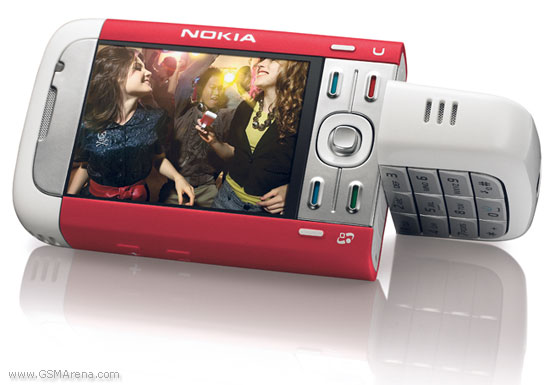
I love Nokia Phone
Recently I have bought a new mobile phone - Nokia 5700 XpressMusic. I love Nokia very much for its simplicity of use and faster processing power. There are several models available in Market with different options. I was little bit confused about which one I should buy. Few are popular for Camera while others are for Music, GPS, Design and so on. Then I search on www.gsmarena.com and did a small research about different models. I hope this will help you too to get your right model of Nokia.
At first I have figure out few features which I want in a typical mobile phone. These are:
- Attractive Design
- Faster Processing Speed
- Larger User Memory
- Symbian OS
- Better Music Quality
- Better Camera
- Larger Screen
- 3G Support
- FM Radio
- GPS (Optional)
I searched in gsmarena.com with two different criteria (processor>=300MHz & Camera>=3MegaPixels). Along with these I also selected Symbian, 3G & FM Radio option. I found following nokia models.:
Processor >= 300MHz
N95, N93, E90, 5700, 6120 classic, 6110, N81, N82, E51
Camera >= 3MP
N95, N93, E90, N82, N73
Among these phones I chose 6 phones and listed all its features:
| Features | 6120 | 6290 | E51 | 5700 | N93 | N95 |
| Style | | Folding | | Twist | Twist | Twist |
| Processor | 369MHz | 369MHz | 369MHz | 369MHz | 332MHz | 332MHz |
| RAM | 64MB | 64MB | 96MB | 64MB | 64MB | 64MB |
| Memory | 35MB | 45MB | 130MB | 35MB | 50MB | 160MB |
| WLAN | No | No | WiFi | No | WiFi | WiFi |
| Symbian | v9.2 S60 | v9.2 S60 3.1 | v9.2 S60 3.1 | v9.2 S60 | v9.1 S60 | v9.2 S60 3.1 |
| Camera | 2MP | 2MP | 2MP | 2MP | 3.15MP | 5MP |
Wednesday, December 19, 2007
Google AdSense - Earn money easily
Few months ago when I got first check of $108 from Google AdSense I was amazed. It was simply incredible, was an easy money for me. I did not do much work for it. Just placed few Ad links in one of my websites. I got that money after few hundreds of clicks. How much you will be get paid is based on page impression. I mean after how much view users click on an Ad.
Let me give you a brief overview of it.
Google AdSense is a way of getting relative advertisement into your website. It gets Ads based on content of your site. After signup you will get three options to place Ads:
- AdSense for Content

- AdSense for Search
- Referrals
AdSense for Content
This type will get ads targeted to your site unique contents. Here you will find three more types to choose - Text, Image & Link. You can customize text and background color to match your site format. Text ads generate more revenue than Image Ads. If you choose link Ads then when a user click on it he/she will be redirected to a new page with list of Ads. You will be only get paid once the user click Ads from this page.
AdSense for Search
This type provide search facility into your website. User can search from this tool and you will be get paid when the user click on a Sponsored result.
Referral
You can also earn money by referring products. There are lots of category to refer. You will be get paid when a user signup/buy services/products after clicking on that Ad. Few referral provides minimum $3 to maximum $38 for each signup. So I think it is the great way to earn more money if you can place it into a suitable place on your website.
I think this brief overview will help you to start Google AdSense. After the first payment my next payment of $116 is ready. I just hold it, will release after few more amount. This money I earned is from one website in six months. Now I have learned how to optimize it and planning to put Ads to my other websites carefully so that I can earn more than $200 per months easily.
Why not sign up today and check by yourself?
Have fun!
Sunday, July 29, 2007
Free call from your mobile
This week I have discovered an exciting news - You can call from your mobile without any cost to each other who have following things:
- Unlimited GPRS/EDGE internet connection in your mobile phone
- Symbian supported phone like - Nokia 6630, 6680, 6681, 6682 etc
- A free software name - Fring

With it you can do following things:
- Call to a fring user from your mobile (In this process two persons need to install fring in their mobile & can directly talk to each other via mobile)
- Call to person from your mobile to a google, skype, msn user (Other person can talk with you from his computer)
- You can also chat with your friends.
I have a Nokia 6680 with fring installed. Three of my friends have fring in their mobile & I talk with them absolutely without any cost. It's voice quality is excellent. I hope you will enjoy it too.
Wanna be a web developer?
- Week 1: You need a book name "Beginning PHP 5" by Wrox publication. It's a good book to start. Read chapter 2, 3, 4 to learn php & also read chapter 9, 10, 11 for mysql.
- Week 2: After reading these 6 chapters now practice all examples found in these chapters. Type the same code in the editor & see how it works in the browser.
- Week 3: Build a simple content management site where people register, login & post articles. Also create an admin panel where administrator can add/edit/delete users & their articles.
- Week 4: Build a photo submission & rating site like www.hotornot.com, www.ivotethis.com or www.whosthebitch.com
- Week 5: You need to understand an ecommerce site. Here is an open source solution name "osCommerce". Download it from www.oscommerce.com, setup & try to understand how it works. Also download the documentation & read it.
- Week 6: Now try to build a simple ecommerce site.
- Week 7: Learn Smarty template. It helps to organize your code by separating php from html. You will find help from here: http://smarty.php.net/crashcourse.php
- Week 8: To become professional you need to have basic idea about the followings:
- CSS
- XHTML
- Javascript
- Photoshop (Specially Slice tool)
- ADODB Library - http://phplens.com/adodb/ (optional)
- Week 9 & 10 (Optional): Now try to understand a script name "Joomla" - www.joomla.org . It's a Content Management Script (CMS). With this open source script you can build any website in the world :) & can deliver to your client fast. It's a great script I have ever found.


